Westinghouse Generator Won't Start: Battery Switch, Choke, Low Oil and CO Sensor
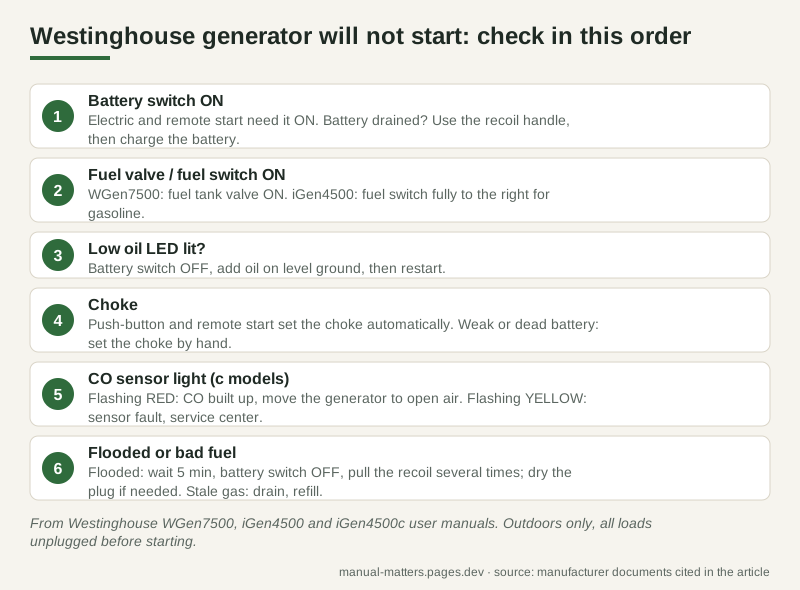
Short answer: on Westinghouse electric-start and remote-start generators (WGen7500, iGen4500 and similar), the first thing to check is the battery switch. It must be ON before push-button or remote start will work, and "battery switch in the OFF position" is the first line in Westinghouse's own "Engine will not start" table. After that, check the fuel valve, the low oil LED, a weak battery that leaves the automatic choke in the wrong position, and on "c" models the CO sensor light. Only then move on to stale fuel, a flooded engine and the spark plug. Everything below comes from Westinghouse's WGen7500, iGen4500 and iGen4500c user manuals.
These checks are specific to Westinghouse. For the general causes that apply to any generator after months in storage, see our generator won't start after storage checklist.
Safety first: run the generator outdoors only, far from doors, windows and vents, and unplug every load before you try to start it. Westinghouse says to never start or stop the generator with electrical devices connected.
1. Battery switch and battery
Westinghouse puts a separate battery switch on the control panel. The WGen7500 manual describes it as "Turns battery ON and OFF. Must be ON before electric or remote start." The stop procedure in the manual ends with "Push the battery switch to the OFF position", so it is usually off when you come back to the machine.
- Switch OFF: turn it ON, then try push-button or remote start again.
- Battery drained: the troubleshooting table's fix is to use the recoil handle to start the generator, then charge the battery.
- How the battery recharges: the WGen7500 manual says the running generator charges the battery after 30–60 minutes of use. The included trickle charger can stay connected and maintain the battery indefinitely. A red light on the charger means charging, green means done.
- Fresh out of the box: the battery ships with its quick-connect plug disconnected and held with a cable tie. The manual's assembly step is to remove the tie and push the plugs together firmly.
If the generator will sit for more than a month, Westinghouse points you to the battery maintenance and storage sections. A battery left alone all winter is a common reason the button does nothing in spring.
2. Fuel valve or fuel switch
- WGen7500: step 2 of "Starting the engine" is to turn the fuel tank valve ON. For a generator used infrequently, the manual suggests turning it OFF when stopping so the carburetor float bowl runs empty, so it is often still off.
- iGen4500 / iGen4500c: there is a fuel switch on the panel. Turn it fully to the right for gasoline. Fully left shuts the fuel valve off.
Also confirm there is gasoline in the tank. "Out of fuel" appears in both the "will not start" and the "starts, then shuts down" rows.
3. Low oil LED
Westinghouse generators have an automatic low oil shutdown. On the iGen4500, when the oil falls below the safe operating limit, the Low Oil LED lights and the generator shuts the engine off automatically.
The troubleshooting table's fix: if the low oil LED is lit, turn the battery switch OFF and add engine oil. Check the level on a dry, flat, level surface, because the manual's pre-start list includes exactly that. If the oil is fine and the engine still starts and then shuts down, Westinghouse lists a defective low oil level switch and tells you to call customer service.
Oil type, capacity and how to read the dipstick on the WGen7500 are in our WGen7500 maintenance guide.
4. Choke: automatic, unless the battery is weak
This is the one most owners miss. With push-button or remote start, the engine sets the choke automatically and runs its own start sequence. If it fails to start, the generator tries two more times by itself.
That automatic choke runs off the battery. The troubleshooting table lists "Choke partially open or closed due to weak or disconnected battery", with the fix "manually set the choke".
- WGen7500, recoil start: the manual says to manually close the choke if the engine is cold before pulling the handle.
- iGen4500 and iGen4500c ("Manually set the choke"): remove the engine service cover and find the small black choke lever on top of the carburetor. To close the choke for a cold start, use a screwdriver to push the lever toward the front of the generator. Start the engine. The start-up sequence should open the choke. If it does not, push the choke open by hand.
So if the battery has been dead or disconnected and the engine just sputters, the choke may be stuck wherever the last start left it.
5. CO sensor light (models ending in "c")
Models with a CO Sensor (for example the iGen4500c) shut the engine down when carbon monoxide builds up around the generator. A panel light tells you why:
| CO sensor light | Meaning (iGen4500c manual) | What to do |
|---|---|---|
| Flashing RED | CO accumulated around the generator. Flashes for at least 5 minutes after the shut-off | Move the generator to an open outdoor area far from occupied spaces, exhaust pointed away. Ventilate the area where it shut down. Then it can be restarted |
| Flashing YELLOW | CO sensor system fault. Flashes for at least 5 minutes | It can be restarted but may keep shutting off. Only an authorized Westinghouse service center can diagnose and repair it |
Two details from the manual:
- The sensor also reacts to CO from other fuel-burning tools whose exhaust points at the generator. Westinghouse says this "is not an error".
- After an automatic shutdown, remote start-equipped generators must be restarted with the START/STOP button on the control panel, not the key fob.
The troubleshooting table also lists "CO sensor removed or modified", with the fix "return to original configuration". Do not bypass it. If you feel sick, dizzy or weak, get to fresh air and call emergency services. For safe placement, see where to put a generator and which extension cords to use.
6. Flooded engine, bad fuel or spark plug
The rest of Westinghouse's "will not start" table:
- Flooded engine (spark plug wet with fuel): wait five minutes, turn the battery switch OFF, and pull the recoil handle rapidly several times. If the generator still does not start, remove the spark plug and dry it.
- Bad fuel (generator stored without treating or draining gasoline, or refueled with bad gas): drain the fuel tank and refuel with fresh gasoline. The WGen7500 manual warns gasoline stored for as little as 30 days can deteriorate and leave gum and varnish that can prevent starting.
- Dirty air filter: clean it.
- Spark plug faulty, fouled or wrongly gapped: gap or replace it. Plug types and gaps differ by model: the WGen7500 uses an F7TC, and the iGen4500 an F7RTC at 0.024–0.032 in. How to measure a gap: spark plug gap guide.
- Fuel filter restricted, fuel pump failure, ignition malfunction, stuck valves: call Westinghouse customer service. The number printed in the manuals is 1 (855) 944-3571.
Stop it happening next time
The WGen7500 manual's storage table:
| Storage time | Westinghouse procedure |
|---|---|
| Less than 1 month | No service required |
| 2 to 6 months | Fresh gasoline plus stabilizer; drain the carburetor float bowl |
| 6 months or longer | Drain the fuel tank and carburetor float bowl |
Keep the battery on its trickle charger. Westinghouse also recommends using fuel stabilizer full time. The trade-offs between draining and stabilizing are in Run it dry or stabilize it?.
All our generator guides: Portable Generators.
FAQ
Why does my Westinghouse generator do nothing when I press start?
The battery switch is the first thing to check. It must be ON for push-button or remote start. If it is on and nothing happens, the battery is probably drained: start with the recoil handle and charge the battery.
My Westinghouse generator tries to start three times and stops. What is wrong?
Push-button and remote start make the first attempt plus two automatic retries. If all three fail, check fuel, the fuel valve and the oil. A weak battery can also leave the automatic choke in the wrong position, so set the choke by hand.
Where is the choke on a Westinghouse iGen4500?
Under the engine service cover: a small black lever on top of the carburetor. Push it toward the front of the generator with a screwdriver to close it for a cold start.
What does a flashing red light mean on a Westinghouse generator with a CO sensor?
Carbon monoxide built up around the generator and the sensor shut it off. Move it to open air, away from buildings, with the exhaust pointed away, then restart it from the control panel button.
What does a flashing yellow CO light mean?
A CO sensor system fault. The generator can be restarted but may keep shutting off. Only an authorized Westinghouse service center can diagnose and repair the sensor.
Sources
- Westinghouse WGen7500 user manual (battery switch, starting, automatic choke and retries, battery maintenance, storage table, troubleshooting): https://images.thdstatic.com/catalog/pdfImages/61/61fecc06-98b6-470f-8fa0-1cead38496b6.pdf
- Westinghouse iGen4500 user manual (low oil LED, fuel switch, manual choke operation, spark plug specification, troubleshooting): https://cdn.westinghouseoutdoorpower.com/owners_manuals/iGen4500_manual_web.pdf
- Westinghouse iGen4500c user manual (CO sensor, red and yellow indicator lights, restart after shutdown, troubleshooting): https://cdn.westinghouseoutdoorpower.com/owners_manuals/iGen4500c_manual_web.pdf